
Know what each project earns before it ends
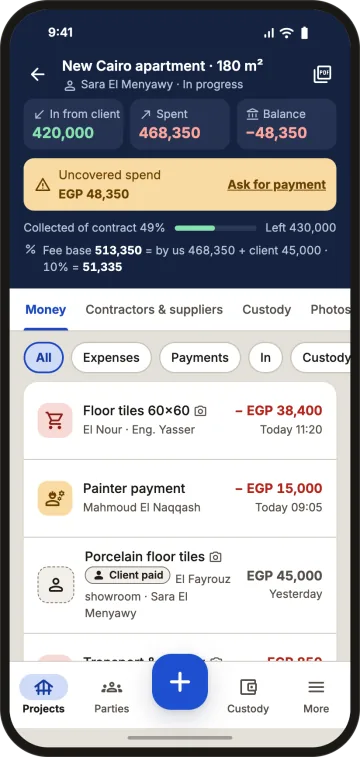
Job costing that keeps up with the site. Snap the invoice, type the amount, save. Every project shows money in from the client, money out, balance and profit, on your phone or computer.
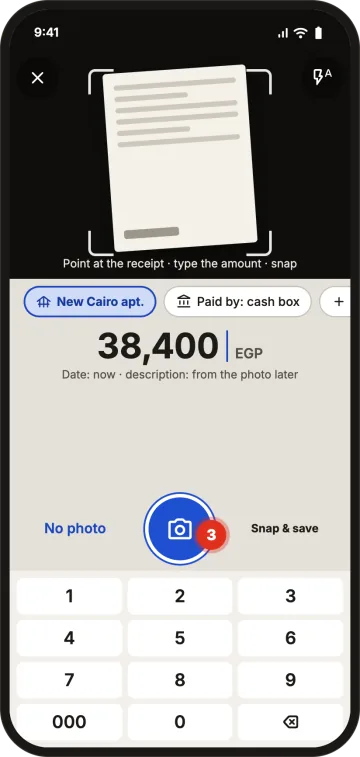
An expense with its invoice in three taps
Tap «New entry» › «Expense / purchase». The camera and keypad open together: aim, type the amount, «Snap and save». No invoice? Save without a photo and it is flagged "no receipt".
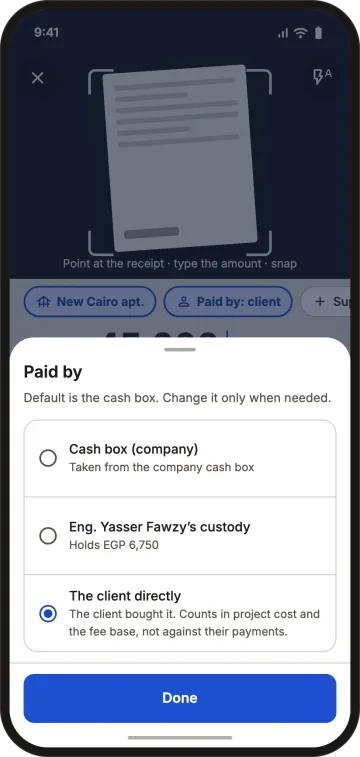
Who paid? Company, petty cash or client
Every expense says who paid: the company cash box (default), an engineer's petty cash, or the client directly. Client-paid materials count in the project cost and your fee base without touching your cash.
The project summary
Contract value, received from client, collected %, spent, balance and contract left. Spending beyond what the client paid shows as uncovered, with a ready payment-request message you paste into WhatsApp. Overpayment shows as "paid over the contract", never a negative number.
Works on site, offline
Entries wait on the phone and sync automatically when you're back online. Anything the server refuses is listed with a retry button.
Every number has a trail
Saved entries are never edited. A correction entry reverses a mistake and the original stays visible. Optional approval keeps engineers' expenses "pending approval" until approved.
Example
Villa, contract EGP 1,200,000. Client paid 500,000. Spent: 380,000 from the company, 70,000 from an engineer's petty cash, 60,000 in unpaid supplier invoices. Total cost 510,000, so 10,000 is uncovered: time to ask for the next payment. (Sample numbers.)
What Qidda doesn't do
It is construction job costing software, not general accounting: no journals, balance sheet or tax returns. Export CSV for your accountant.
FAQ
Can I log an expense offline?
Yes. Log it with the invoice photo offline and it syncs automatically when you're connected.
Can I edit an expense after saving it?
Saved entries are never edited. You add a correction entry that reverses the mistake, and the original stays visible.
Can I split a project into line items?
Yes. The Items tab holds BOQ lines with quantity and unit price, and expenses can be tagged to a line.
How do I see a project's profit?
The project header shows contract value, money in, money out and balance, plus the fee base and fee for cost-plus projects.
See what every project earns, starting today.
1 project free · No password · No waiting for activation