
The notebook served you well. Let your phone take over.
The paper notebook was every contractor's first accounting tool: fast, no battery, no internet. With several sites and several engineers it starts letting you down.
What paper does well
Fast, no battery or signal, no learning, cheap, and a craftsman can sign it in front of you.
Where it lets you down
Lost or soaked pages · receipts in pockets · unreadable handwriting · adding up by hand · one copy only · disputes without proof · petty cash nobody can explain.
Comparison
| Paper notebook | Qidda | |
|---|---|---|
| Speed | ✓ seconds | ✓ three taps with the invoice photo |
| No internet, no battery | ✓ | offline ✓, needs a charged phone |
| Cost | ✓ price of a notebook | first project free with 3 users, then EGP 2,000 per project, once |
| Invoice photo with the amount | ✗ | ✓ |
| Automatic totals and balances | ✗ | ✓ |
| A copy for you in the office | ✗ | ✓ |
| Safe from loss and damage | ✗ | ✓ stored on the server |
| Engineers' petty cash | manual | ✓ |
| Subcontractor and supplier accounts | manual | ✓ |
| Statements for client or craftsman | handwritten | ✓ branded PDF |
| Receiver's signature | ✓ | ✓ on the printed payment voucher |
| Fixing mistakes | crossing out | ✓ correction entry, original kept |
As fast as paper
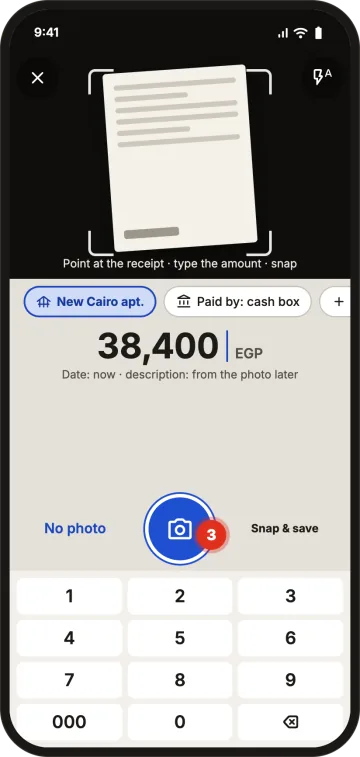
New entry › Expense: camera and keypad open together. Aim, type, snap and save. No signal saves on the phone and syncs later.
Start today in three steps
Sign up with Google or email, no password · create your project with opening balances from the notebook · invite engineers by WhatsApp link and top up their petty cash.
FAQ
I'm not great with phones. Will it work for me?
If you use WhatsApp you can use Qidda: an expense is a photo, a number and a save button.
What if there's no internet on site?
Log expenses and invoice photos offline; they sync automatically when you're connected.
What if I lose my phone?
Data is kept on the server, not only on the phone. Sign in on a new phone with an email link and it's all there; only entries not yet synced before the loss could be lost.
Do I have to copy the whole old notebook?
No. Enter each project's current balances as a start, then record new entries day by day.
A notebook that never gets lost or soaked, in your pocket.
1 project free · No password · No waiting for activation