
Your client follows the project from a link
Log client payments and issue a receipt under your company name, then share the client link: they open it on their phone and see their payments, what was spent and the photos you picked. No app, no account, no password.
Client payments and receipts
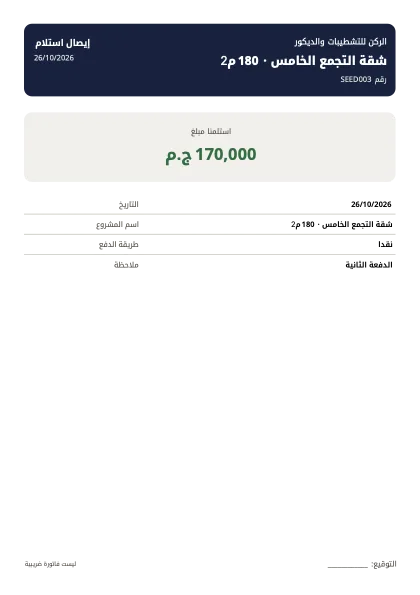
Log a payment from the client and issue a numbered PDF receipt with your logo and a signature line. It proves receipt and is not a tax invoice.
Paid and left
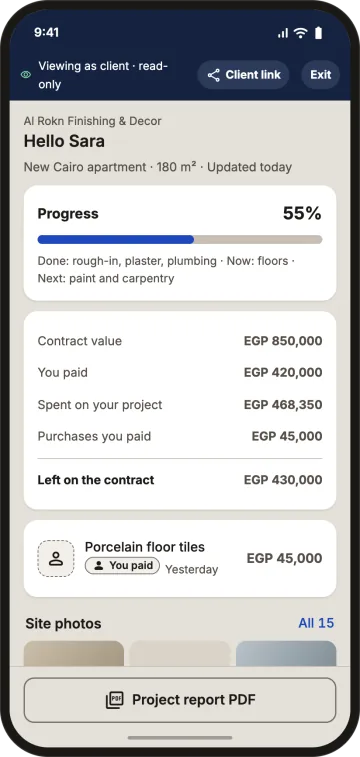
Contract, received, collected % and left. Spending ahead of payments shows as uncovered with a ready payment-request message; overpayment shows as such, never negative.
A link with no account
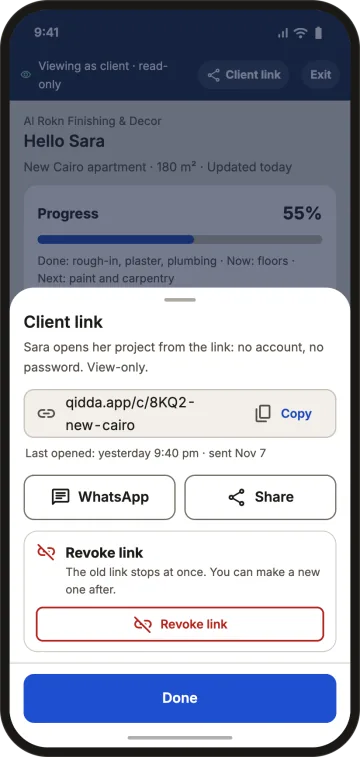
Turn on "client sees the project", create the link and share it on WhatsApp or copy it. You see when it was last opened.
You control what shows
Their payments, expenses without supplier names, and photos you mark with the eye. Never your profit, fee, petty cash or suppliers. Preview it with "view as client"; the client can download a project report PDF with the allowed sections only.
Client-bought materials
Materials the client paid for directly appear under "purchases you paid for".
Revoke anytime
Revoke stops the link at once; a new link replaces the old one.
Example
Contract EGP 600,000; client paid 450,000 in three payments; their link shows 450,000 paid, 430,000 spent, 45,000 of tiles they bought, and kitchen photos. (Sample numbers.)
FAQ
Does the client need to install the app?
No. They open the link in any browser, with no account or password.
Can the client see my profit?
No. They see only what you choose: their payments, expenses without supplier names, and the photos you selected.
What if I sent the link to the wrong person?
Revoke it and it stops working at once, then create a new link for the client.
Is the receipt a tax invoice?
No. It proves you received the money and says it is not a tax invoice.
Spare your client the question, and yourself the call.
1 project free · No password · No waiting for activation