
BOQ items: budget, spend and progress per line
Turn the bill of quantities you agreed with the client into a live spending plan. Each line in the Items tab shows budget, spent, left and progress.
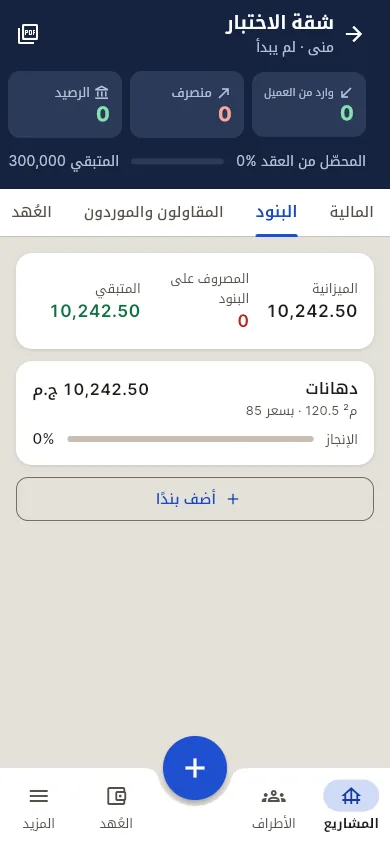
BOQ lines inside the project
Name, quantity, unit and unit price. The line budget is quantity × unit price by default, or type your own. Example: internal plaster 600 m² × EGP 120 = 72,000. Finished lines can be archived, never lost.
Tag expenses and supplier invoices to a line
Pick the line when you log an expense or an on-credit invoice. Qidda adds up everything spent on it.
Budget, spent, left
Totals for the whole project at the top, and the same three numbers under each line.
Over-budget warning
"Spent 80,000 · over budget by 8,000" shows under the line, so you catch quantity or price changes early.
Progress per line
Set progress with a slider and compare it with the share of budget spent.
Example
150 m² apartment, four lines: plaster 72,000, plumbing 45,000, electrical 38,000, paint 54,000. Budget EGP 209,000. After a month plaster is 70,000 spent at 90% progress; plumbing 30,000 at 40%. (Sample numbers.)
Not in Qidda today
Quotes, estimates and turning an estimate into a project are not in the current version, and there are no material price tables. Need a blank BOQ now? Download the free template.
FAQ
Can a line's budget differ from quantity × price?
Yes. Leave it empty to calculate it, or type the budget you agreed.
Does Qidda build a quote for the client from the BOQ?
Not in the current version. Items are for tracking a signed project; quotes are planned later.
What happens when a line goes over budget?
The line shows how much was spent and how far over budget it is. Saving is never blocked.
Does the client see the BOQ?
The client link shows only what you allow: their payments, expenses without supplier names, and selected photos.
Turn your BOQ into a budget you check every day.
1 project free · No password · No waiting for activation